TinyMCE AI on-premises: advanced scenarios
This guide covers enterprise scenarios for the AI on-premises service through concrete examples. Each scenario builds on the Getting started guide; teams may implement any scenario on its own.
Internal knowledge base through MCP
Use case: Engineers writing documentation can query internal wikis, API specs, and runbooks directly from the editor, without switching context.

Configuration reference
The Model Context Protocol (MCP) allows the AI service to call external tools (internal wikis, API specs, runbooks, contract databases, compliance checkers) from inside conversations. The AI service connects over Streamable HTTP transport.
| Option | Description |
|---|---|
|
HTTP endpoint of the MCP server (Streamable HTTP transport). |
|
Auth headers sent with every request. Single shared token per server. See Single-shared-token limitation. |
|
Array of tool names to block from LLM access. |
|
Per-tool-call timeout in seconds (default 60). |
| MCP tools are available in AI conversations only, not in reviews or quick actions. |
On Linux Docker, add extra_hosts: ["host.docker.internal:host-gateway"] to the AI service to reach MCP servers running on the host.
|
Single-shared-token limitation
The headers field is fixed at deploy time. Every MCP tool call shares the same token; there is no per-user MCP authentication path yet. If the MCP server needs per-user context, encode it in the conversation prompt or in a header that maps user identity at the MCP server side (for example, using a token the MCP server itself swaps for a per-user identity).
Implementation
-
Create an MCP server that exposes the knowledge base:
Knowledge-base MCP server (Express)
// knowledge-mcp-server.js const express = require('express'); const app = express(); app.use(express.json()); const KNOWLEDGE_BASE = { 'api-guidelines': 'All REST APIs must use JSON, include pagination through Link headers, and return 4xx for client errors with a machine-readable error code.', 'deployment-process': 'Deployments require: 1) PR approval, 2) passing CI, 3) staging verification, 4) production canary (5% traffic for 30min), 5) full rollout.', 'security-policy': 'All user data must be encrypted at rest (AES-256) and in transit (TLS 1.3). PII requires additional field-level encryption.', }; app.post('/mcp', (req, res) => { const { method, id, params } = req.body; if (method === 'initialize') { return res.json({ jsonrpc: '2.0', id, result: { protocolVersion: '2024-11-05', capabilities: { tools: {} }, serverInfo: { name: 'knowledge-hub', version: '1.0.0' } } }); } if (method === 'tools/list') { return res.json({ jsonrpc: '2.0', id, result: { tools: [{ name: 'search_knowledge_base', description: 'Search the company knowledge base for policies, guidelines, and procedures', inputSchema: { type: 'object', properties: { query: { type: 'string', description: 'Search query' } }, required: ['query'] } }, { name: 'get_api_spec', description: 'Get the OpenAPI spec for an internal service', inputSchema: { type: 'object', properties: { service: { type: 'string', description: 'Service name (for example user-service, billing-api)' } }, required: ['service'] } }] } }); } if (method === 'tools/call') { const { name, arguments: args } = params; if (name === 'search_knowledge_base') { const query = (args?.query || '').toLowerCase(); const results = Object.entries(KNOWLEDGE_BASE) .filter(([key]) => key.includes(query) || query.includes(key.split('-')[0])) .map(([key, value]) => `##${key}\n${value}`) .join('\n\n'); return res.json({ jsonrpc: '2.0', id, result: { content: [{ type: 'text', text: results || 'No results found.' }] } }); } return res.json({ jsonrpc: '2.0', id, result: { content: [{ type: 'text', text: 'Spec not found for: ' + args?.service }] } }); } res.json({ jsonrpc: '2.0', id, error: { code: -32601, message: 'Unknown method' } }); }); app.listen(3001, () => console.log('Knowledge MCP server on http://localhost:3001/mcp')); -
Configure the AI service:
-e MCP_SERVERS='{ "knowledge-hub": { "url": "http://host.docker.internal:3001/mcp", "options": { "callToolTimeout": 30 } } }' -
Sample AI chat message:
"What are the API guidelines for error handling?"
The assistant calls the
search_knowledge_basetool, retrieves the relevant policy, and responds with sourced information without leaving the rich text editor.
Multi-tenant SaaS platform
Use case: A SaaS platform provides AI writing features to customers. Each customer gets isolated conversations, separate large language model (LLM) budgets, and per-tenant configuration.
Architecture
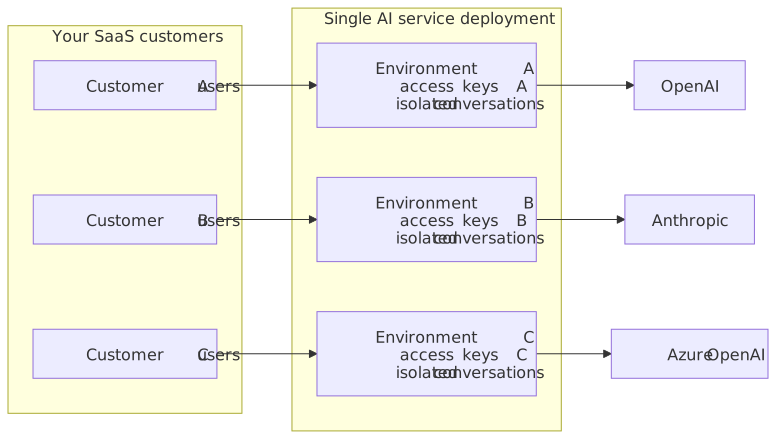
Each environment provides:
-
Its own access keys (independent rotation)
-
Isolated conversation history (queries are partitioned by
subwithin an environment) -
Separate billing and usage tracking (through Langfuse or a custom metrics pipeline)
Implementation
-
Create one environment per customer through the Management Panel:
-
Customer A → Environment
env-customer-a -
Customer B → Environment
env-customer-b -
Customer C → Environment
env-customer-c
-
-
Token server generates JSON Web Tokens (JWTs) with the correct environment:
Multi-tenant JWT generation
app.post('/api/ai-token', requireAuth, (req, res) => { const customer = getCustomerConfig(req.user.organizationId); const token = jwt.sign({ aud: customer.envId, sub: req.user.id, user: { name: req.user.name, email: req.user.email }, auth: { ai: { permissions: getPermissionsForPlan(customer.plan) } } }, customer.apiSecret, { algorithm: 'HS256', expiresIn: '1h' }); res.json({ token }); }); function getPermissionsForPlan(plan) { switch (plan) { case 'enterprise': return ['ai:conversations:*', 'ai:models:agent', 'ai:actions:system:*', 'ai:reviews:system:*']; case 'pro': return ['ai:conversations:*', 'ai:actions:system:*']; case 'basic': return ['ai:actions:system:*']; } } function envFor(tenantId) { return { envId: process.env[`AI_ENV_ID_${tenantId}`], apiSecret: process.env[`AI_API_SECRET_${tenantId}`] }; } -
Result: Full data isolation between customers, with feature gating based on subscription tier.
Conversation history is isolated by the sub claim in the JWT. Reusing a single sub value for multiple users within one environment causes those users to share conversation history. Always use a stable, unique-per-user identifier (such as an internal user ID) as the sub value.
|
Custom models with guardrails
Use case: A regulated industry (healthcare, finance, legal) needs AI writing assistance but must use approved models with content filtering.
Implementation
-
Use a self-hosted model with an OpenAI-compatible API (such as vLLM or Ollama):
-e PROVIDERS='{ "approved-llm": { "type": "openai-compatible", "baseUrl": "http://host.docker.internal:8080/v1", "headers": {"Authorization": "Bearer internal-key"} } }' -
Restrict to specific models only:
-e MODELS='[{ "id": "llama-3.1-70b-medical", "name": "Medical Assistant (Llama 3.1 70B)", "description": "Fine-tuned for medical documentation. HIPAA-compliant.", "provider": "approved-llm", "recommended": true, "features": ["conversations", "reviews", "actions"] }, { "id": "llama-3.1-8b-general", "name": "General Writing (Llama 3.1 8B)", "description": "Fast general-purpose model for drafting and editing.", "provider": "approved-llm", "features": ["actions"] }]' -
Result: The configuration exposes only approved, audited models. Content does not leave the network. Combine with Langfuse for a full audit trail.
AI-powered document pipeline
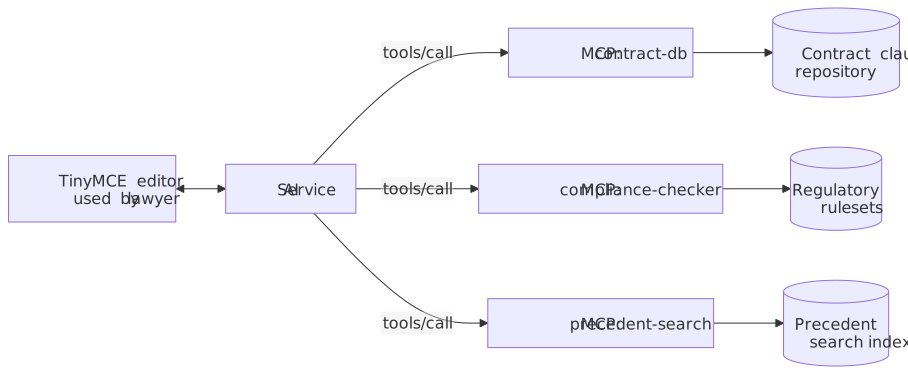
Use case: Legal team drafts contracts. AI assists with clause generation, compliance checking, and precedent search, powered by internal legal databases.
Configuration
Document pipeline MCP server configuration
-e MCP_SERVERS='{
  "contract-db": {
    "url": "http://host.docker.internal:3001/mcp",
    "options": {"callToolTimeout": 30}
  },
  "compliance-checker": {
    "url": "http://host.docker.internal:3002/mcp",
    "options": {"callToolTimeout": 60}
  },
  "precedent-search": {
    "url": "http://host.docker.internal:3003/mcp",
    "tools": {"disabled": ["delete_precedent"]},
    "options": {"callToolTimeout": 120}
  }
}'
Example prompts:
-
"Draft a non-compete clause for California employees"
-
"Check this contract section for GDPR compliance issues"
-
"Find precedent for limitation of liability in SaaS agreements"
Internal databases supply the data for these prompts. Aside from the LLM request itself, no content goes to external services.
Web-augmented research assistant
Use case: Content team writing blog posts and marketing copy can pull live data from the web and internal sources.
Configuration
-e WEBRESOURCES_ENABLED='true' \
-e WEBRESOURCES_ENDPOINT='http://host.docker.internal:4000/scrape' \
-e WEBRESOURCES_REQUEST_TIMEOUT='10000' \
-e WEBSEARCH_ENABLED='true' \
-e WEBSEARCH_ENDPOINT='http://host.docker.internal:4001/search' \
-e WEBSEARCH_REQUEST_TIMEOUT='10000' \
-e WEBSEARCH_HEADERS='{"Authorization":"Bearer search-api-key"}'
Web scraping endpoint contract
| Direction | Payload |
|---|---|
Request |
JSON object with a |
Response |
JSON object with |
{ "url": "https://example.com/article" }{ "type": "text/html", "data": "<html><body><p>Example page body</p></body></html>" }Scraper example (Playwright)
// scraper-service.js
const { chromium } = require('playwright');
const express = require('express');
const app = express();
app.use(express.json());

app.post('/scrape', async (req, res) => {
  const browser = await chromium.launch();
  const page = await browser.newPage();
  await page.goto(req.body.url, { waitUntil: 'networkidle' });
  const content = await page.content();
  await browser.close();
  res.json({ type: 'text/html', data: content });
});

app.listen(4000);
Web search endpoint contract
| Direction | Payload |
|---|---|
Request |
JSON object with a |
Response |
JSON object with a |
{ "query": "search string" }{
"results": [
{
"url": "https://example.com/article",
"text": "Content snippet",
"title": "Article Title",
"author": "Author",
"publishedAt": "2026-04-30T10:00:00Z",
"favicon": "https://example.com/favicon.ico"
}
]
}Search example (SerpAPI)
// search-service.js
const express = require('express');
const app = express();
app.use(express.json());

app.post('/search', async (req, res) => {
  const response = await fetch(
    `https://serpapi.com/search.json?q=${encodeURIComponent(req.body.query)}&api_key=${process.env.SERP_API_KEY}`
  );
  const data = await response.json();
  const results = (data.organic_results || []).slice(0, 5).map(r => ({
    url: r.link,
    title: r.title,
    text: r.snippet
  }));
  res.json({ results });
});

app.listen(4001);
A model must include capabilities.webSearch: true in its MODELS entry to expose the web search toggle.
|
Example prompts:
-
"Research the latest trends in AI governance and write a summary"
-
"Read this URL and rewrite the key points for the target audience: https://…"
For production deployment guidance including Kubernetes manifests, scaling, security hardening, rate limiting, and observability, see Production deployment.
For common errors and debugging steps, see Troubleshooting.