TinyMCE AI On-Premise
The TinyMCE AI on-premises service is a self-hosted back end that powers AI writing assistance inside the TinyMCE rich text editor. It runs entirely within the host infrastructure. Editor content, conversation history, file attachments, and user data never leave the network.
The service ships as a single Open Container Initiative (OCI) container image (registry.containers.tiny.cloud/ai-service). It exposes a REST API, a Management Panel, Server-Sent Events streaming, and an OpenAPI spec.
Architecture

Data flow for a single AI request:
-
The browser loads TinyMCE with the
tinymceaiplugin. -
The user triggers an AI feature (chat, review, quick action).
-
The plugin calls the token endpoint, which signs an HS256 JSON Web Token (JWT) with the API Secret.
-
The plugin sends the JWT and prompt to the AI service.
-
The AI service verifies the token, checks per-feature permissions, and forwards the prompt to the configured large language model (LLM).
-
The LLM streams its response back to the browser through Server-Sent Events.
The shared secret (API Secret) never leaves the back end; the editor and the AI service only ever see signed tokens.
Capabilities
| Capability | Details |
|---|---|
Conversational AI assistant |
Multi-turn chat sidebar. Conversation history is isolated per user through the JWT |
Document review |
Correctness, clarity, readability, tone, and translation. |
Quick actions |
Rewrite, summarize, expand, change tone, fix grammar, translate, continue, and improve writing. |
LLM provider flexibility |
OpenAI, Anthropic, Google Gemini, Azure OpenAI, AWS Bedrock, Google Vertex AI, or any self-hosted OpenAI-compatible endpoint. Multiple providers can coexist. |
Model Context Protocol (MCP) integration |
Connect internal tools, databases, and knowledge bases through Model Context Protocol over Streamable HTTP transport. |
Web scraping and web search |
Pluggable endpoints for fetching web pages and running searches. |
Multi-tenant environments |
Isolated conversation history and per-tenant access keys through Environments. |
Per-user, per-feature permissions |
Fine-grained control through the |
Streaming responses |
Server-Sent Events from the LLM back to the browser. |
File attachments |
Database, filesystem, Amazon S3, or Azure Blob Storage. |
Observability |
Structured request logs, OpenTelemetry, and Langfuse. All three run as independent simultaneous pipelines. |
Horizontal scaling |
The service is stateless. Share identical environment configuration across replicas. |
Prerequisites
| Requirement | Details |
|---|---|
Container runtime |
Docker 20.10+, Podman 4+, or any OCI-compatible runtime. Kubernetes, AWS ECS, or Azure Container Apps are also supported. |
SQL database |
MySQL 8.0 or PostgreSQL 13+ (16 recommended). |
Redis |
3.2.6+ (7.x recommended). Single node, Sentinel, or Cluster mode. |
LLM access |
At least one provider. Multiple providers can coexist. |
TinyMCE 8.0+ |
The |
License key and registry credentials |
Provided by a Tiny account representative. |
Token endpoint |
A back end that signs HS256 JWTs. |
Reverse proxy |
The AI service does not terminate Transport Layer Security (TLS). Use nginx, HAProxy, or a cloud load balancer. |
Choosing a setup path
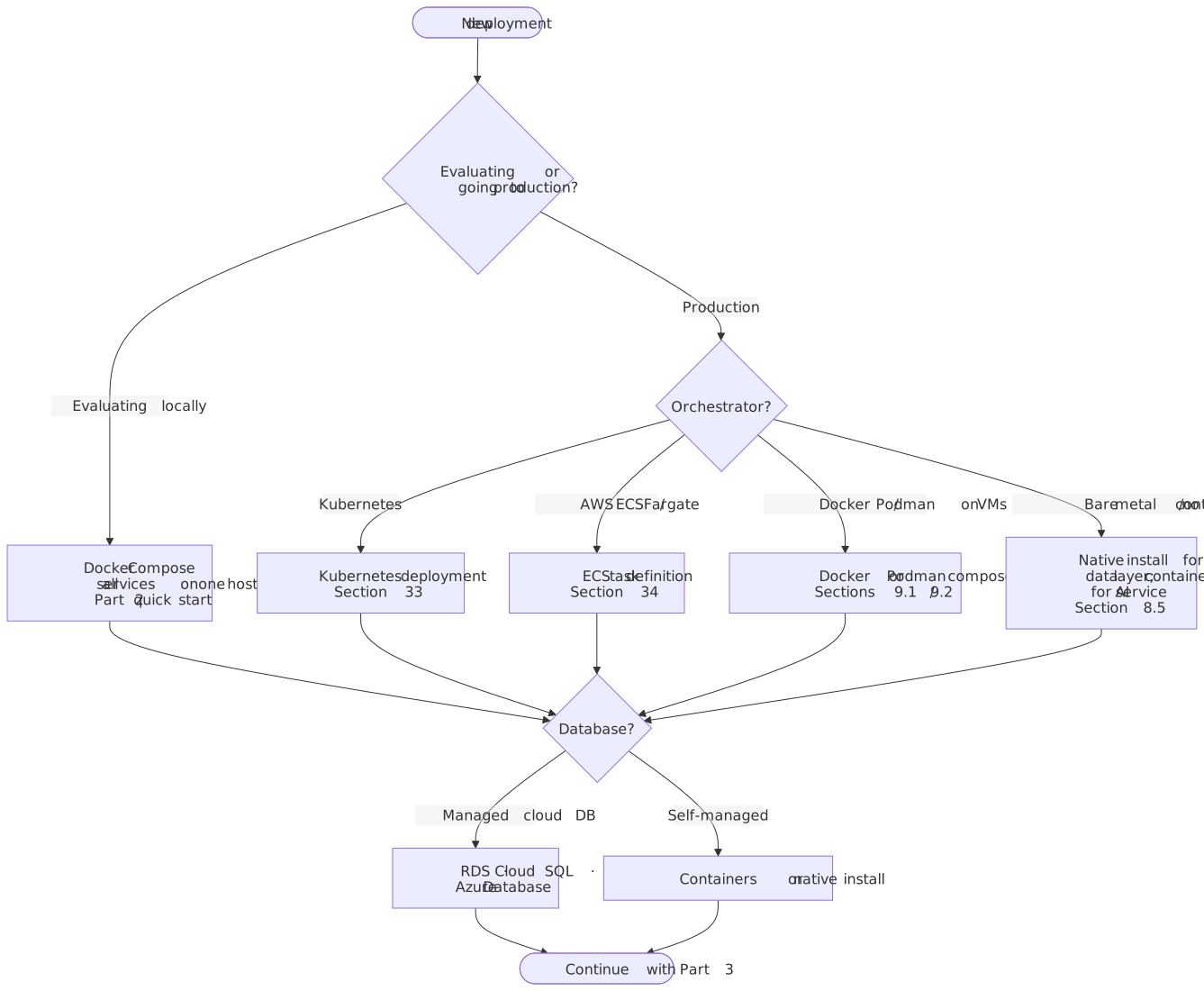
Each path carries the same level of documentation. After identifying which path fits the operational model, complete its topic guides in the order listed.
Topic guides
For a first-time deployment, progress through the guides in order. Each topic guide also stands alone when only one area applies.
| Guide | Scope |
|---|---|
Five-minute Docker Compose quick start. Stand up the AI service, database, Redis, token server, and a browser editor. |
|
MySQL and PostgreSQL setup, Redis configuration, container runtimes (Docker, Podman, Kubernetes, ECS), and reverse proxy with TLS. |
|
OpenAI, Anthropic, Google Gemini, Azure OpenAI, AWS Bedrock, Google Vertex AI, and self-hosted endpoints (Ollama, vLLM, LM Studio). Custom model catalog and API key rotation. |
|
HS256 signing model, required and optional claims, permissions reference, and token endpoint examples in 8 languages. |
|
Editor-side configuration: plugin options, token provider, authentication patterns, Cross-Origin Resource Sharing (CORS), and deployment checklists. |
|
Kubernetes manifests, AWS ECS task definitions, horizontal scaling, sizing, security hardening, rate limiting, observability, backup and recovery, and upgrades. |
|
MCP server integration, web scraping and search, multi-tenant patterns, custom models with guardrails, and AI-powered document pipelines. |
|
Quick triage, container startup failures, JWT errors, LLM provider errors, editor issues, performance, and diagnostic recipes. |
|
Environment variable reference, API endpoint reference, Server-Sent Events reference, and error code reference. |
Support
-
Technical support: Submit a support request (available to customers with an active commercial license).
-
Account and licensing: Contact Tiny.
When submitting a support request, include:
- Container logs
-
docker logs ai-service --tail 200 - Effective environment
-
Redact secrets before submitting.
docker inspect ai-service | jq '.[0].Config.Env' - Health check
-
curl -fsS http://localhost:8000/healthExpected response:
{"serviceName":"on-premises-http","uptime":1234} - Decoded JWT payload
-
Strip the signature and decode with a JWT library.
- Image version
-
docker inspect ai-service | jq '.[0].Config.Image'