Troubleshooting
Match the symptom to the fix below. If the symptom does not fit any section, escalate to support@tiny.cloud with the output of docker logs ai-service --tail 200 and a redacted copy of the PROVIDERS value.
Quick triage
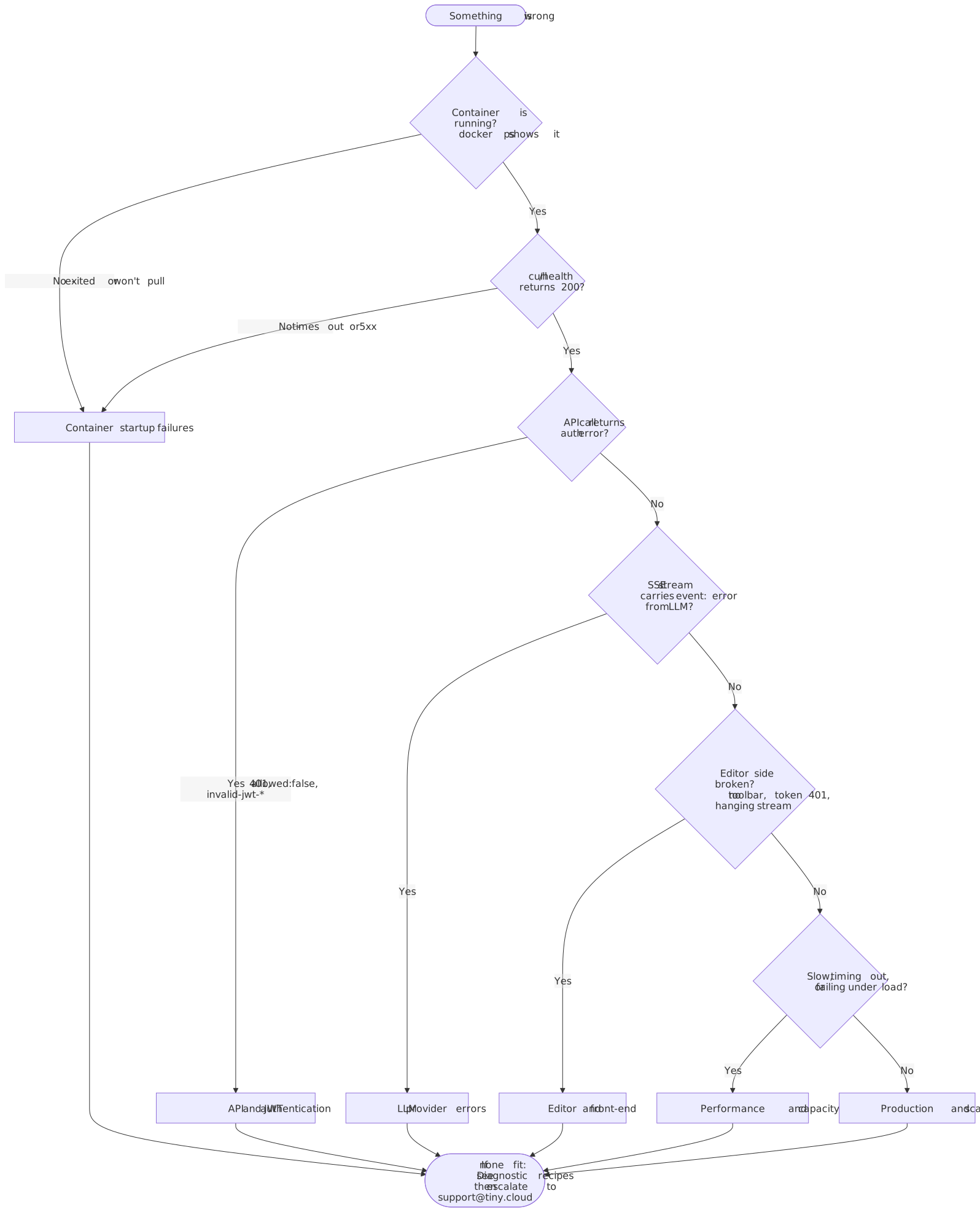
| Symptom area | Go to |
|---|---|
Container will not start or exits during boot |
|
Container is running, |
|
Conversation starts, but the Server-Sent Events (SSE) stream carries an |
|
Editor renders, but AI toolbar is missing, token fetch fails, or responses hang |
|
Responses are slow or time out |
|
Scaling, upgrades, or deployment questions |
Container startup failures
Run docker logs ai-service first. All entries below assume the log output is available.
| Error / symptom | Cause | Fix |
|---|---|---|
|
Key was truncated, contains a line break, or has surrounding whitespace |
Paste the key as a single unbroken line. Verify the first and last eight characters against the original. |
|
|
Switch to |
|
MySQL user lacks required privileges |
Grant the privileges listed in the error. See Database, Redis, and storage for the GRANT statement. |
|
Postgres schema not pre-created |
Run |
|
|
Pin |
Container exits with no useful log |
Missing required env var, or malformed JSON in |
Run |
|
Port mapping missing |
Add |
|
AI service is on a different Docker network from the data layer |
Use |
API and JSON Web Token (JWT) authentication
These assume the container is running and /health returns OK.
| Error / symptom | Cause | Fix |
|---|---|---|
|
Token signed with the wrong key. Most commonly, signed with |
Re-copy the API Secret from the Management Panel at |
|
|
Copy the Environment ID from |
|
Token is past its |
Issue tokens with a reasonable lifetime (for example |
|
Environment was not created through the Management Panel UI |
Delete and recreate the environment through |
JWT silently rejected |
Token signed with RS256 instead of HS256 |
Re-sign with |
|
|
Use the explicit array form. See the correct shape below. |
|
Stream abort left temporary state blocking the conversation |
Start a new conversation or reload the page. Custom UIs should create a fresh conversation after cancel. |
Correct permissions shape
{
  "auth": {
    "ai": {
      "permissions": [
        "ai:conversations:*",
        "ai:models:agent",
        "ai:actions:system:*",
        "ai:reviews:system:*"
      ]
    }
  }
}
Common mistakes that produce allowed: false: "permissions": "ai:admin" (string shorthand), "permissions": "*", "useAllFeatures": true, or a single permission as a string instead of an array. See JWT authentication for the full permission catalog.
Large language model (LLM) provider errors
These appear as event: error inside the SSE stream. The HTTP response is still 200.
Cloud providers (OpenAI, Anthropic, Google)
| Error | Fix |
|---|---|
|
Update the key in |
AWS Bedrock
| Error | Fix |
|---|---|
|
Inline |
|
Enable model access in Bedrock console → Model access. Attach an IAM policy with |
|
Complete the AWS Marketplace subscription for Anthropic in Bedrock console → Model access → Anthropic. |
|
Use the region-prefixed inference profile ID (for example |
Google Vertex AI
| Error | Fix |
|---|---|
|
Inline |
Auth errors with a valid service account |
|
|
Run |
Blocked by GCP org policy |
Check |
Azure OpenAI
| Error | Fix |
|---|---|
Model not found / |
|
API errors with no provider message |
Set |
OpenAI-compatible (Ollama, vLLM, LM Studio)
| Error | Fix |
|---|---|
"Not Found" in SSE error |
|
|
Start Ollama with |
"does not support tools" |
Use an official model ( |
|
Model is too slow for the default timeout. Set |
Editor and front end
Confirm /health is OK and a direct curl to /v1/conversations works before investigating the editor.
| Symptom | Fix |
|---|---|
No AI buttons in the toolbar |
Ensure TinyMCE 8+ is loaded, |
Token fetch returns 401 |
The token endpoint’s own authentication middleware is rejecting the request. Check session cookies, Cross-Origin Resource Sharing (CORS) credentials, and bearer tokens in the browser network tab. |
Token returned but rejected by the AI service |
See API and JSON Web Token (JWT) authentication above: wrong secret, wrong |
AI responses hang in the browser |
The reverse proxy is buffering the SSE stream. Set |
CORS error on |
Add the editor’s origin (scheme + host + port) to the |
Editor renders then disappears (Next.js / Nuxt / SvelteKit) |
TinyMCE references |
|
Token endpoint is returning an invalid JWT or non-JSON response. Test with |
Performance
| Symptom | Fix |
|---|---|
Self-hosted model is slow through the AI service compared with raw |
Co-locate the inference server with the AI service. Use a smaller or more quantized model. Disable telemetry during development ( |
Containers OOM or MySQL takes 60+ seconds to start (Colima) |
Default Colima VM is too small. Run |
Diagnostic recipes
Expand for copy-ready diagnostic commands
Tail logs:
docker logs ai-service --tail 200 -fLiveness check:
curl -fsS http://localhost:8000/healthDecode a JWT (inspect payload without verifying):
python3 -c "import jwt,sys,json; print(json.dumps(jwt.decode(sys.argv[1], options={'verify_signature': False}), indent=2))" <token>Recreate after an env change:
docker compose up -d --force-recreate ai-serviceInspect effective environment:
docker inspect ai-service | jq '.[0].Config.Env'Validate PROVIDERS JSON:
echo "$PROVIDERS" | jq .Test data layer connectivity from inside the container:
docker compose exec ai-service /bin/sh -c "nc -zv mysql 3306"
docker compose exec ai-service /bin/sh -c "nc -zv redis 6379"
End-to-end smoke test (token mint through streamed response):
TOKEN=$(curl -s -X POST http://localhost:3000/api/ai-token | jq -r '.token')

curl -s -X POST http://localhost:8000/v1/conversations \
  -H "Authorization: Bearer $TOKEN" \
  -H "Content-Type: application/json" \
  -d '{"id":"smoke-1","title":"Smoke test"}'

curl -N -X POST http://localhost:8000/v1/conversations/smoke-1/messages \
  -H "Authorization: Bearer $TOKEN" \
  -H "Content-Type: application/json" \
  -d '{"prompt":"Say hi in five words.","model":"agent-1"}'