LLM provider configuration
The PROVIDERS environment variable tells the AI service how to reach the upstream large language model (LLM). The MODELS environment variable tells the service which models are exposed to clients and which features each model supports. This page is the definitive reference for both: every supported type, every required field, and every known issue encountered in production.
Start with the Getting Started guide if the AI service container is not yet running. The following sections assume a running ai-service container.
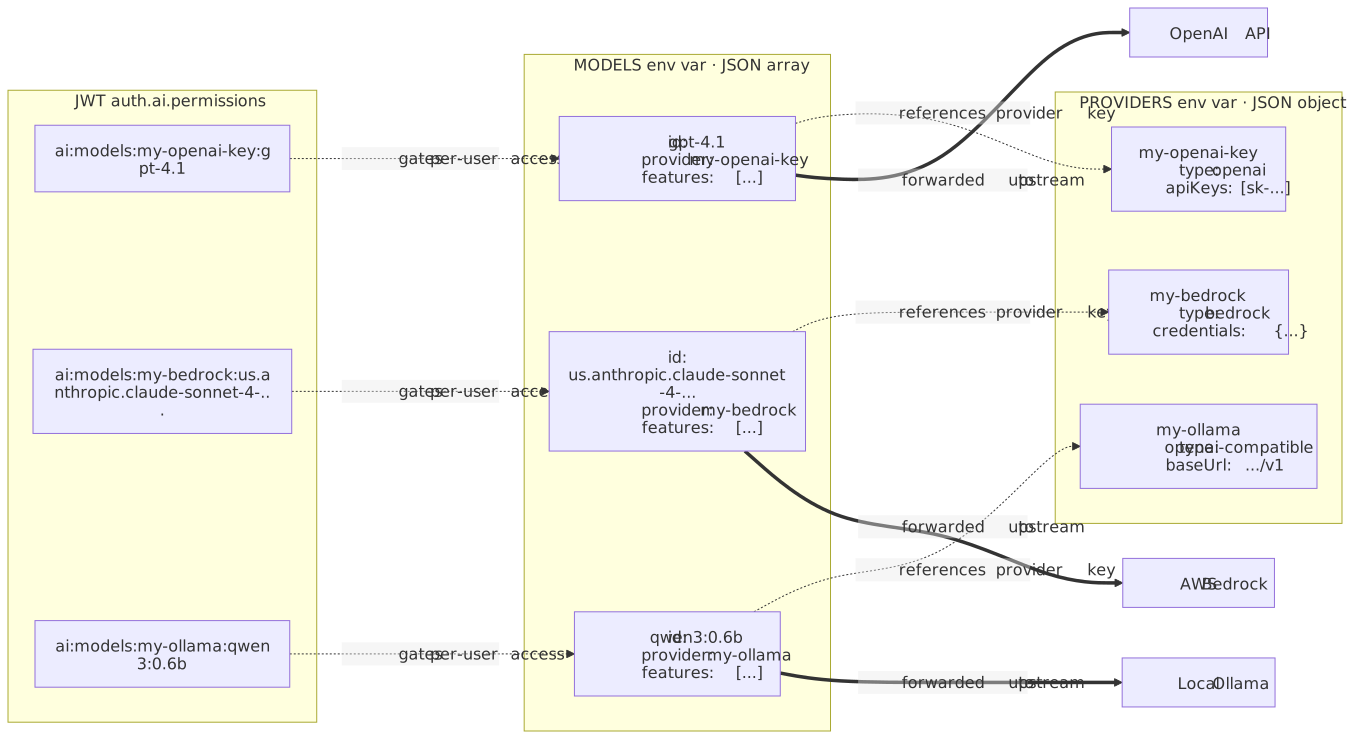
Provider and model architecture
The AI service uses two related environment variables:
| Variable | Type | What it does |
|---|---|---|
|
JSON object |
Map of provider IDs to provider configurations. Each entry says how to authenticate with one upstream LLM API. |
|
JSON array |
List of models exposed to clients. Each model points at a |
JSON Web Token (JWT) |
string array |
Per-user authorization list. Includes |
The PROVIDERS keys are arbitrary identifiers (for example "openai", "my-bedrock", "team-azure"). Each value object has a type field that picks the implementation:
type |
Provider |
|---|---|
|
OpenAI (api.openai.com) |
|
Anthropic (api.anthropic.com) |
|
Google AI Studio / Gemini direct |
|
Azure OpenAI Service |
|
AWS Bedrock |
|
Google Cloud Vertex AI |
|
Any OpenAI-compatible HTTP API (Ollama, vLLM, LM Studio, llama.cpp, LocalAI, OpenRouter, Together, Groq, Fireworks, and similar) |
The key (not the type) is what gets referenced from:
-
MODELS[].provider; to wire a model to a provider -
JWT
auth.ai.permissions; for per-provider or per-model access control (see JWT authentication)
{
  "my-openai-key":   { "type": "openai",   "apiKeys": ["sk-proj-..."] },
  "my-bedrock":      { "type": "bedrock",  "region": "us-east-1", "credentials": { "accessKeyId": "...", "secretAccessKey": "..." } },
  "my-ollama":       { "type": "openai-compatible", "baseUrl": "http://host.docker.internal:11434/v1" }
}
Defining the model list
The on-premises service ships with a built-in default model list that covers only OpenAI, Anthropic, and Google direct. For every other provider type (Azure, Bedrock, Vertex, openai-compatible), define MODELS explicitly; otherwise nothing usable is exposed.
When only PROVIDERS is configured and MODELS is omitted, a GET /v1/models/1 call returns only the built-in agent-1 placeholder with allowed: false:
{
  "models": [
    { "id": "agent-1", "allowed": false, "features": [] }
  ]
}
Clients (the TinyMCE editor included) will then fall back to the disabled agent and every AI request will fail with no useful error in the UI. The model list endpoint also only accepts the literal version 1:
# Works
curl http://localhost:8000/v1/models/1

# All 500
curl http://localhost:8000/v1/models/v1
curl http://localhost:8000/v1/models/v2
curl http://localhost:8000/v1/models/latest
Minimum MODELS entry to make a model usable:
[
  {
    "id": "gpt-4o-mini",
    "provider": "my-openai-key",
    "description": "OpenAI GPT-4o mini",
    "features": ["conversations", "reviews", "actions"]
  }
]
The features array must include at least one of conversations, reviews, or actions for the model to be selectable for that feature. A model with no overlapping features is invisible to that part of the UI.
A full field reference for MODELS is at the end of this page.
OpenAI
API key from platform.openai.com. With OpenAI alone, MODELS can be omitted; the built-in catalog covers common models.
Configuration details
JSON shape:
{
  "openai": {
    "type": "openai",
    "apiKeys": ["sk-proj-YOUR_KEY_HERE"]
  }
}
Fields:
| Field | Required | Notes |
|---|---|---|
|
Yes |
Literal |
|
Yes |
Array of one or more API keys. Multiple keys allow zero-downtime rotation. |
|
No |
Override only if proxying through a private OpenAI gateway. |
Full docker run example:
docker run --init -d -p 8000:8000 \
  --name ai-service \
  -e LICENSE_KEY="$LICENSE_KEY" \
  -e ENVIRONMENTS_MANAGEMENT_SECRET_KEY="$MANAGEMENT_SECRET" \
  -e DATABASE_DRIVER='mysql' \
  -e DATABASE_HOST='mysql' \
  -e DATABASE_USER='root' \
  -e DATABASE_PASSWORD="$DB_PASSWORD" \
  -e DATABASE_DATABASE='ai_service' \
  -e REDIS_HOST='redis' \
  -e STORAGE_DRIVER='database' \
  -e PROVIDERS='{"openai":{"type":"openai","apiKeys":["sk-proj-YOUR_KEY_HERE"]}}' \
  registry.containers.tiny.cloud/ai-service:latest
Verify:
curl -s -H "Authorization: Bearer sk-proj-YOUR_KEY_HERE" \
  https://api.openai.com/v1/models | head -20
When that curl call succeeds from the host, the same key in PROVIDERS works inside the container.
Project-scoped keys (sk-proj-…) only work for models the project has been granted access to. A 404 on gpt-4o usually means the key’s project is restricted. Org-level keys require the org header, which the service does not send; use a project key instead.
|
Anthropic
API key from console.anthropic.com. Same shape as OpenAI.
Configuration details
JSON shape:
{
  "anthropic": {
    "type": "anthropic",
    "apiKeys": ["sk-ant-YOUR_KEY_HERE"]
  }
}
Fields:
| Field | Required | Notes |
|---|---|---|
|
Yes |
Literal |
|
Yes |
Array. Rotation behaves the same as OpenAI. |
Reasoning models:
Claude 4.x models (Sonnet 4, Opus 4) support extended thinking. To surface the reasoning toggle in the TinyMCE UI, add capabilities.reasoning: true to the model entry in MODELS:
{
  "id": "claude-sonnet-4-5",
  "provider": "anthropic",
  "description": "Anthropic Claude Sonnet 4.5 with extended thinking",
  "capabilities": { "reasoning": true },
  "features": ["conversations", "reviews", "actions"]
}
Minimal example:
-e PROVIDERS='{"anthropic":{"type":"anthropic","apiKeys":["sk-ant-YOUR_KEY_HERE"]}}'Verify:
curl -s https://api.anthropic.com/v1/models \
  -H "x-api-key: sk-ant-YOUR_KEY_HERE" \
  -H "anthropic-version: 2023-06-01"
Google (Gemini direct)
Direct Gemini access through Google AI Studio. Distinct from Vertex AI; different keys, different endpoints, different billing path.
Configuration details
JSON shape:
{
  "google": {
    "type": "google",
    "apiKeys": ["AIza-YOUR_KEY_HERE"]
  }
}
Fields:
| Field | Required | Notes |
|---|---|---|
|
Yes |
Literal |
|
Yes |
Array of |
Minimal example:
-e PROVIDERS='{"google":{"type":"google","apiKeys":["AIza-YOUR_KEY_HERE"]}}'Verify:
curl -s "https://generativelanguage.googleapis.com/v1beta/models?key=AIza-YOUR_KEY_HERE"
AI Studio AIza keys do not work against Vertex endpoints. For Vertex, see the Google Vertex AI section.
|
| Free-tier keys are heavily rate limited and return 429 responses under modest load. Move to a paid tier before load testing or production traffic. |
Azure OpenAI
Azure-hosted OpenAI models. Requires an Azure subscription, an Azure OpenAI resource, and at least one deployment. The MODELS[].id must match the Azure deployment name exactly.
Configuration details
Prerequisites in the Azure portal:
-
Create an Azure OpenAI resource. Note the resource name; this is the subdomain prefix in
https://<RESOURCE_NAME>.openai.azure.com. -
Apply for model access if required by the region.
-
In Azure AI Studio, create a deployment for each model to expose. The deployment name is arbitrary (for example
prod-gpt4o,cheap-mini). -
Copy one of the two API keys from Keys and Endpoint in the resource overview.
JSON shape:
{
  "azure": {
    "type": "azure",
    "resourceName": "YOUR_RESOURCE_NAME",
    "apiKeys": ["YOUR_AZURE_KEY_HERE"],
    "apiVersion": "2024-10-21"
  }
}
Fields:
| Field | Required | Notes |
|---|---|---|
|
Yes |
Literal |
|
Yes |
The |
|
Yes |
Array. Azure issues two keys per resource for zero-downtime key rotation. |
|
Yes |
Always set explicitly. Omitting it produces a confusing SDK error about a missing query string parameter. Refer to Microsoft’s API version matrix for current stable values. |
The MODELS[].id value must match the Azure deployment name exactly. A mismatch produces a DeploymentNotFound error. Use human-readable deployment names because the ID also appears in JWT permission strings and the editor model picker.
|
Two-deployment example:
-e PROVIDERS='{
  "azure": {
    "type": "azure",
    "resourceName": "tinymce-ai",
    "apiKeys": ["YOUR_AZURE_KEY_HERE"],
    "apiVersion": "2024-10-21"
  }
}'

-e MODELS='[
  {
    "id": "prod-gpt4o",
    "provider": "azure",
    "name": "GPT-4o (production)",
    "description": "Azure deployment of GPT-4o for production traffic",
    "recommended": true,
    "features": ["conversations", "reviews", "actions"]
  },
  {
    "id": "cheap-mini",
    "provider": "azure",
    "name": "GPT-4o mini (low cost)",
    "description": "Azure deployment of GPT-4o mini for cheap actions",
    "features": ["reviews", "actions"]
  }
]'
Verify:
curl -s -H "api-key: YOUR_AZURE_KEY_HERE" \
  "https://YOUR_RESOURCE_NAME.openai.azure.com/openai/deployments?api-version=2024-10-21"
Expect a JSON list that includes the deployment IDs from MODELS.
Wrong region quota: each Azure region has independent quotas. Bursty workloads may throttle at modest QPS; split traffic across resources in different regions if needed. Content filter false positives: Azure’s safety filter is stricter than OpenAI direct. Reviews on certain technical content can return content_filter errors. Configure custom content filter policies in Azure AI Studio.
|
AWS Bedrock
Amazon’s hosted-model marketplace (Anthropic, Meta, Mistral, Cohere, Amazon Titan). Credentials must be inlined; the AWS SDK default credential chain is not used.
Configuration details
The AI service does not use the AWS SDK default credential chain. AWS_PROFILE, ~/.aws/credentials, IAM Roles for Service Accounts (IRSA), EC2 instance profiles, ECS task roles, and web identity tokens are all ignored. Inline the credentials in the PROVIDERS JSON.
|
JSON shape:
{
  "bedrock": {
    "type": "bedrock",
    "region": "us-east-1",
    "credentials": {
      "accessKeyId": "AKIA_YOUR_KEY_HERE",
      "secretAccessKey": "YOUR_SECRET_HERE",
      "sessionToken": "OPTIONAL_FOR_STS"
    }
  }
}
The sessionToken field is optional but required for STS-issued short-lived credentials. Plan a rotation procedure when using temporary credentials.
Prerequisites checklist:
-
Enable model access. Bedrock console → Model access → Manage model access. Each model must be approved per-region.
-
Subscribe through AWS Marketplace for non-Amazon models. Anthropic Claude on Bedrock requires a one-time Marketplace subscription.
-
Create an IAM user or role with the permissions below.
-
Pick a region that has the model. Not every model is in every region. Check Bedrock console > Model catalog before assuming.
Required IAM permissions:
{
  "Version": "2012-10-17",
  "Statement": [
    {
      "Sid": "BedrockInvoke",
      "Effect": "Allow",
      "Action": [
        "bedrock:InvokeModel",
        "bedrock:InvokeModelWithResponseStream",
        "bedrock:Converse",
        "bedrock:ConverseStream"
      ],
      "Resource": "*"
    }
  ]
}
The service uses both InvokeModel and Converse paths depending on the model family, so include both.
Claude 4.x cross-region inference profiles:
Claude 4.x on Bedrock uses cross-region inference profiles rather than per-region model IDs. The MODELS[].id must be the inference profile ID, prefixed with the regional group:
| Region group | Example profile ID |
|---|---|
US |
|
EU |
|
APAC |
|
Using the bare model ID (anthropic.claude-sonnet-4-5-…) returns ValidationException.
Minimal example:
-e PROVIDERS='{
  "bedrock": {
    "type": "bedrock",
    "region": "us-east-1",
    "credentials": {
      "accessKeyId": "AKIA_YOUR_KEY_HERE",
      "secretAccessKey": "YOUR_SECRET_HERE"
    }
  }
}'

-e MODELS='[
  {
    "id": "us.anthropic.claude-sonnet-4-5-20250929-v1:0",
    "provider": "bedrock",
    "name": "Claude Sonnet 4.5 (Bedrock)",
    "description": "Anthropic Claude Sonnet 4.5 through AWS Bedrock cross-region inference",
    "recommended": true,
    "capabilities": { "reasoning": true },
    "features": ["conversations", "reviews", "actions"]
  }
]'
Verify before running the AI service:
aws bedrock list-foundation-models --region us-east-1 \
  --query 'modelSummaries[?contains(modelId,`claude`)].[modelId,modelLifecycle.status]' \
  --output table
aws bedrock-runtime converse \
--region us-east-1 \
--model-id us.anthropic.claude-sonnet-4-5-20250929-v1:0 \
--messages '[{"role":"user","content":[{"text":"Say hello in five words."}]}]'If either fails, the AI service fails with the same root cause; fix IAM and model access before continuing.
AccessDeniedException almost always means missing model access in the Bedrock console. ThrottlingException on the first call indicates low default quotas; request an increase through Service Quotas. ValidationException means a mismatch between regional model IDs and cross-region inference profiles. INVALID_PAYMENT_INSTRUMENT indicates a missing AWS Marketplace subscription.
|
Google Vertex AI
Google’s enterprise model surface. Project-scoped, IAM-driven, GCP-billed. Credentials must be inlined (same limitation as Bedrock).
Configuration details
The Vertex adapter ignores Application Default Credentials (ADC), GOOGLE_APPLICATION_CREDENTIALS, GKE Workload Identity, and Compute Engine metadata server credentials. Inline either a service-account key or an account-bound API key in the PROVIDERS JSON.
|
JSON shape (service account):
{
  "vertex": {
    "type": "vertex",
    "project": "YOUR_GCP_PROJECT_ID",
    "location": "us-central1",
    "credentials": {
      "clientEmail": "ai-service@YOUR_GCP_PROJECT_ID.iam.gserviceaccount.com",
      "privateKey": "-----BEGIN PRIVATE KEY-----\nMIIE...\n-----END PRIVATE KEY-----\n"
    }
  }
}
JSON shape (account-bound API key):
{
  "vertex": {
    "type": "vertex",
    "project": "YOUR_GCP_PROJECT_ID",
    "location": "us-central1",
    "apiKeys": ["YOUR_VERTEX_API_KEY"]
  }
}
Fields:
| Field | Required | Notes |
|---|---|---|
|
Yes |
Literal |
|
Yes |
GCP project ID, not the project number. |
|
Yes |
Region, for example |
|
If using SA |
The |
|
If using SA |
The |
|
If using account-bound key |
Array of one or more Vertex-bound API keys. |
private_key newline escaping:
When copying the private_key from a GCP service account JSON key into a .env file and then expanding with set -a && source .env, the shell collapses the \n sequences and the key becomes invalid (Vertex returns invalid_grant). A reliable approach is to build the entire PROVIDERS value using a JSON serializer:
python3 - <<'EOF' > providers.json
import json
sa = json.load(open("/path/to/service-account.json"))
providers = {
    "vertex": {
        "type": "vertex",
        "project": sa["project_id"],
        "location": "us-central1",
        "credentials": {
            "clientEmail": sa["client_email"],
            "privateKey": sa["private_key"]
        }
    }
}
print(json.dumps(providers))
EOF

export PROVIDERS="$(cat providers.json)"
Account-bound API keys still require a service account:
The Vertex "account-bound API key" is bound to a Google Cloud project AND a service account inside that project. A service account must exist and have roles/aiplatform.user granted; the API key only avoids distributing the private key.
GCP org policies that block setup:
| Org policy | Blocks |
|---|---|
|
Creating the service account. Symptom: |
|
Downloading a JSON key. Symptom: Create key greyed out, or |
|
Account-bound API key creation. Symptom: |
When a GCP org enforces any of these, the security or cloud team must grant a project-level exception or pre-provision the credentials.
Minimal example:
-e PROVIDERS='{
  "vertex": {
    "type": "vertex",
    "project": "tinymce-ai",
    "location": "us-central1",
    "credentials": {
      "clientEmail": "ai-service@tinymce-ai.iam.gserviceaccount.com",
      "privateKey": "-----BEGIN PRIVATE KEY-----\nMIIEv...\n-----END PRIVATE KEY-----\n"
    }
  }
}'

-e MODELS='[
  {
    "id": "gemini-2.0-flash-001",
    "provider": "vertex",
    "name": "Gemini 2.0 Flash (Vertex)",
    "description": "Google Gemini 2.0 Flash through Vertex AI",
    "features": ["conversations", "reviews", "actions"]
  }
]'
The service account needs roles/aiplatform.user (or a custom role with aiplatform.endpoints.predict and aiplatform.endpoints.streamGenerateContent).
Verify:
gcloud auth activate-service-account \
  --key-file=/path/to/service-account.json

gcloud ai models list \
  --region=us-central1 \
  --project=YOUR_GCP_PROJECT_ID
Region mismatch: set location to a region that hosts the model. SERVICE_DISABLED means the Vertex AI API is not enabled; run gcloud services enable aiplatform.googleapis.com. Quota: new projects default to 5 QPS; request an increase before production traffic.
|
OpenAI-compatible (Ollama, vLLM, LM Studio, and similar)
For any HTTP API that implements the OpenAI Chat Completions interface, including self-hosted runtimes and commercial aggregators (OpenRouter, Together, Groq, Fireworks). The baseUrl must include the /v1 suffix.
Configuration details
JSON shape:
{
  "local-llm": {
    "type": "openai-compatible",
    "baseUrl": "http://host.docker.internal:11434/v1",
    "apiKeys": ["optional-bearer-token"],
    "headers": { "X-Custom-Header": "value" }
  }
}
Fields:
| Field | Required | Notes |
|---|---|---|
|
Yes |
Literal |
|
Yes |
Must include the |
|
No |
Sent as |
|
No |
Additional headers such as auth tokens or tenant IDs. |
File uploads through this adapter are limited to image/* MIME types. PDFs and Office documents are not forwarded. To work with non-image files, route through an OpenAI, Anthropic, or Bedrock provider instead.
|
Ollama-specific setup:
Ollama listens on 127.0.0.1:11434 by default, which is unreachable from inside a Docker container. Bind to all interfaces:
OLLAMA_HOST=0.0.0.0:11434 ollama serveOn Linux with systemd, create an override file instead:
# /etc/systemd/system/ollama.service.d/override.conf
[Service]
Environment="OLLAMA_HOST=0.0.0.0:11434"
Then reload and restart: sudo systemctl daemon-reload && sudo systemctl restart ollama.
On Linux, add the host gateway so host.docker.internal resolves:
services:
  ai-service:
    image: registry.containers.tiny.cloud/ai-service:latest
    extra_hosts:
      - "host.docker.internal:host-gateway"
If Ollama returns "does not support tools", the model was built from a raw GGUF without a chat template. Use ollama pull for a Library model that includes a proper Modelfile, or author a custom one.
FROM /path/to/your-model.gguf

TEMPLATE """{{ if .System }}<|im_start|>system
{{ .System }}<|im_end|>
{{ end }}{{ range .Messages }}<|im_start|>{{ .Role }}
{{ .Content }}<|im_end|>
{{ end }}<|im_start|>assistant
"""

PARAMETER stop "<|im_end|>"
PARAMETER stop "<|im_start|>"
The exact template depends on the base model. Check the model card for the recommended chat template. Verify tool support with ollama show <model> before connecting to the AI service.
The reasoning toggle (capabilities.reasoning: true) is cosmetic for Ollama-backed models; the openai-compatible adapter does not translate it to the native Ollama API.
Timeout:
Large self-hosted models on consumer hardware can exceed the default 180-second timeout. Override with:
-e LLM_TIMEOUT_MS='600000'Example — Ollama:
-e PROVIDERS='{
  "ollama": {
    "type": "openai-compatible",
    "baseUrl": "http://host.docker.internal:11434/v1"
  }
}'

-e MODELS='[
  {
    "id": "qwen3:0.6b",
    "provider": "ollama",
    "name": "Qwen3 0.6B (local)",
    "description": "Local Ollama model for fast actions",
    "features": ["conversations", "reviews", "actions"]
  }
]'

-e LLM_TIMEOUT_MS='600000'
Example — vLLM:
-e PROVIDERS='{
  "vllm": {
    "type": "openai-compatible",
    "baseUrl": "http://vllm-host.internal:8001/v1",
    "apiKeys": ["YOUR_VLLM_TOKEN"]
  }
}'

-e MODELS='[
  {
    "id": "meta-llama/Llama-3.1-8B-Instruct",
    "provider": "vllm",
    "name": "Llama 3.1 8B (vLLM)",
    "description": "Self-hosted Llama 3.1 8B served through vLLM",
    "features": ["conversations", "reviews", "actions"]
  }
]'
Example — LM Studio:
-e PROVIDERS='{
  "lmstudio": {
    "type": "openai-compatible",
    "baseUrl": "http://host.docker.internal:1234/v1"
  }
}'

-e MODELS='[
  {
    "id": "lmstudio-community/Meta-Llama-3.1-8B-Instruct-GGUF",
    "provider": "lmstudio",
    "name": "Llama 3.1 8B (LM Studio)",
    "description": "Local LM Studio runtime",
    "features": ["conversations", "actions"]
  }
]'
Verify:
curl -s http://host.docker.internal:11434/v1/chat/completions \
  -H "Content-Type: application/json" \
  -d '{
    "model": "qwen3:0.6b",
    "messages": [{"role":"user","content":"Say hello in five words."}],
    "stream": false
  }'
When the curl call returns a chat completion, the AI service can use the same endpoint.
Multiple providers coexistence
PROVIDERS is a single JSON object that may contain any number of entries. Each entry is independent; the service maintains a separate client pool per provider. There is no limit beyond JSON-in-env-var size constraints (many shells allow 64 KB+ or more in a single variable).
A MODELS array routes individual models to specific providers using the provider field, which must match a PROVIDERS key exactly (case-sensitive).
Example: three providers, mixed routing
Click to expand: three-provider PROVIDERS and MODELS example
-e PROVIDERS='{
  "openai":     { "type": "openai",    "apiKeys": ["sk-proj-YOUR_KEY_HERE"] },
  "bedrock-us": {
    "type": "bedrock",
    "region": "us-east-1",
    "credentials": {
      "accessKeyId": "AKIA_YOUR_KEY_HERE",
      "secretAccessKey": "YOUR_SECRET_HERE"
    }
  },
  "ollama":     { "type": "openai-compatible", "baseUrl": "http://host.docker.internal:11434/v1" }
}'

-e MODELS='[
  {
    "id": "gpt-4o",
    "provider": "openai",
    "name": "GPT-4o",
    "description": "OpenAI flagship model for conversations",
    "recommended": true,
    "features": ["conversations"]
  },
  {
    "id": "us.anthropic.claude-sonnet-4-5-20250929-v1:0",
    "provider": "bedrock-us",
    "name": "Claude Sonnet 4.5 (Bedrock)",
    "description": "Claude on Bedrock for reviews",
    "capabilities": { "reasoning": true },
    "features": ["reviews"]
  },
  {
    "id": "qwen3:0.6b",
    "provider": "ollama",
    "name": "Qwen3 0.6B (local)",
    "description": "Local model for cheap quick actions",
    "features": ["actions"]
  }
]'
This wires conversations to OpenAI, reviews to Bedrock-hosted Claude, and quick actions to a local Ollama model. The TinyMCE editor will pick the appropriate provider for each feature based on which models declare which features.
A MODELS entry with a provider value that does not exist in PROVIDERS is silently skipped; that model will not appear in /v1/models/1. When a model is missing from the model selector in the rich text editor, check the spelling of its provider field.
MODELS field reference
Top-level fields
| Field | Required | Type | Default | Notes |
|---|---|---|---|---|
|
Yes |
string |
- |
Model identifier sent to the upstream provider. For Azure, this must match the deployment name. For Bedrock, this must match the model ID or inference profile. |
|
Yes |
string |
- |
Must match a key in |
|
Yes |
string |
- |
Shown in model picker tooltips. |
|
No |
string |
value of |
Display name in the model picker. |
|
No |
boolean |
|
If |
|
No |
boolean |
|
Whether to allow the web search toggle for this model. Requires |
|
No |
boolean |
|
Whether to expose a reasoning/extended-thinking toggle. Supported providers include Anthropic, Bedrock-Claude, and OpenAI o-series. Cosmetic for Ollama (see openai-compatible section). |
|
No |
object |
see below |
Per-model context constraints. |
|
Yes |
|
- |
Which features the model is eligible for. Must contain at least one usable feature. |
contextLimits defaults
| Field | Default | Unit |
|---|---|---|
|
|
characters |
|
|
count |
|
|
bytes |
|
|
bytes |
|
|
pages |
Override contextLimits only when necessary, for example when a model has a smaller real context window than the default 256K character budget, or when a deployment policy restricts file size.
Available features strings
The full set of feature strings recognized by the service:
conversations
conversations.titleGeneration
reviews
reviews.correctness
reviews.clarity
reviews.readability
reviews.make-longer
reviews.make-shorter
reviews.make-tone-casual
reviews.make-tone-direct
reviews.make-tone-friendly
reviews.make-tone-confident
reviews.make-tone-professional
reviews.translate
actions
actions.make-longer
actions.make-shorter
actions.continue
actions.make-tone-casual
actions.make-tone-direct
actions.make-tone-friendly
actions.make-tone-confident
actions.make-tone-professional
actions.translate
actions.fix-grammar
actions.improve-writing
The three umbrella values conversations, reviews, and actions enable the entire family. Use a specific sub-feature only when restricting a model to a subset; for example, a low-cost model that handles only actions.fix-grammar.
A model with no features entry, or with only sub-features the editor does not request, will be hidden from the picker.
Rotating API keys without downtime
The apiKeys field on every provider type that has one is an array. The service treats all entries as valid for incoming requests, which allows rotating keys with zero downtime:
-
Append the new key to the array:
"apiKeys": ["sk-proj-OLD_KEY", "sk-proj-NEW_KEY"] -
Restart the AI service container so it picks up the new
PROVIDERSvalue. -
Verify the new key works (run a chat completion through the service).
-
Revoke the old key in the provider console.
-
Remove the old key from
apiKeys:"apiKeys": ["sk-proj-NEW_KEY"] -
Restart the AI service container again.
The same procedure works for anthropic, google, azure, and openai-compatible provider types. For Bedrock and Vertex, swap the credentials object atomically; there is no array of credential objects, so plan a short maintenance window or run two AI service replicas behind a load balancer for a no-downtime swap.
Quick troubleshooting index
| Symptom | Most likely cause | Section |
|---|---|---|
Editor shows "model unavailable" / |
|
|
|
Wrong compatibility version |
|
Bedrock returns |
Relying on the AWS default credential chain |
Bedrock |
Bedrock returns |
Model access not enabled in console |
Bedrock prerequisites |
Bedrock returns |
Bare model ID used instead of cross-region inference profile |
Bedrock |
Bedrock returns |
Missing AWS Marketplace subscription for the model family |
Bedrock prerequisites |
Vertex returns |
|
Vertex |
Vertex returns |
aiplatform.googleapis.com not enabled |
Vertex |
Azure returns |
|
Azure |
Azure SDK errors about missing API version |
|
Azure |
Ollama: "Not Found" in SSE |
|
OpenAI-compatible |
Ollama: "does not support tools" |
Bare-GGUF Modelfile without chat template |
OpenAI-compatible |
Ollama: reasoning toggle has no effect |
Not supported through the openai-compatible adapter |
OpenAI-compatible |
Self-hosted model times out at 180s |
Default |
OpenAI-compatible |
AI request hangs forever in browser |
Reverse proxy buffering SSE |
See Production deployment for the reverse proxy and TLS section |
More general troubleshooting (database, JWT, storage, networking) lives in Troubleshooting.
See also
-
Getting started — initial container bring-up and demo
-
JWT authentication — per-model and per-provider JWT permissions
-
Database, Redis, and storage — MySQL/Postgres configuration for the AI service
-
Troubleshooting — general troubleshooting beyond provider configuration