JWT authentication for the on-premises AI service
The on-premises AI service uses HS256 (HMAC-SHA256, symmetric shared secret) for JSON Web Token (JWT) authentication. This is different from the Tiny Cloud AI service, which uses RS256.
|
Do not follow the Cloud JWT guide for on-premises deployments. The on-premises verifier silently rejects RS256-signed tokens with |
End-to-end flow
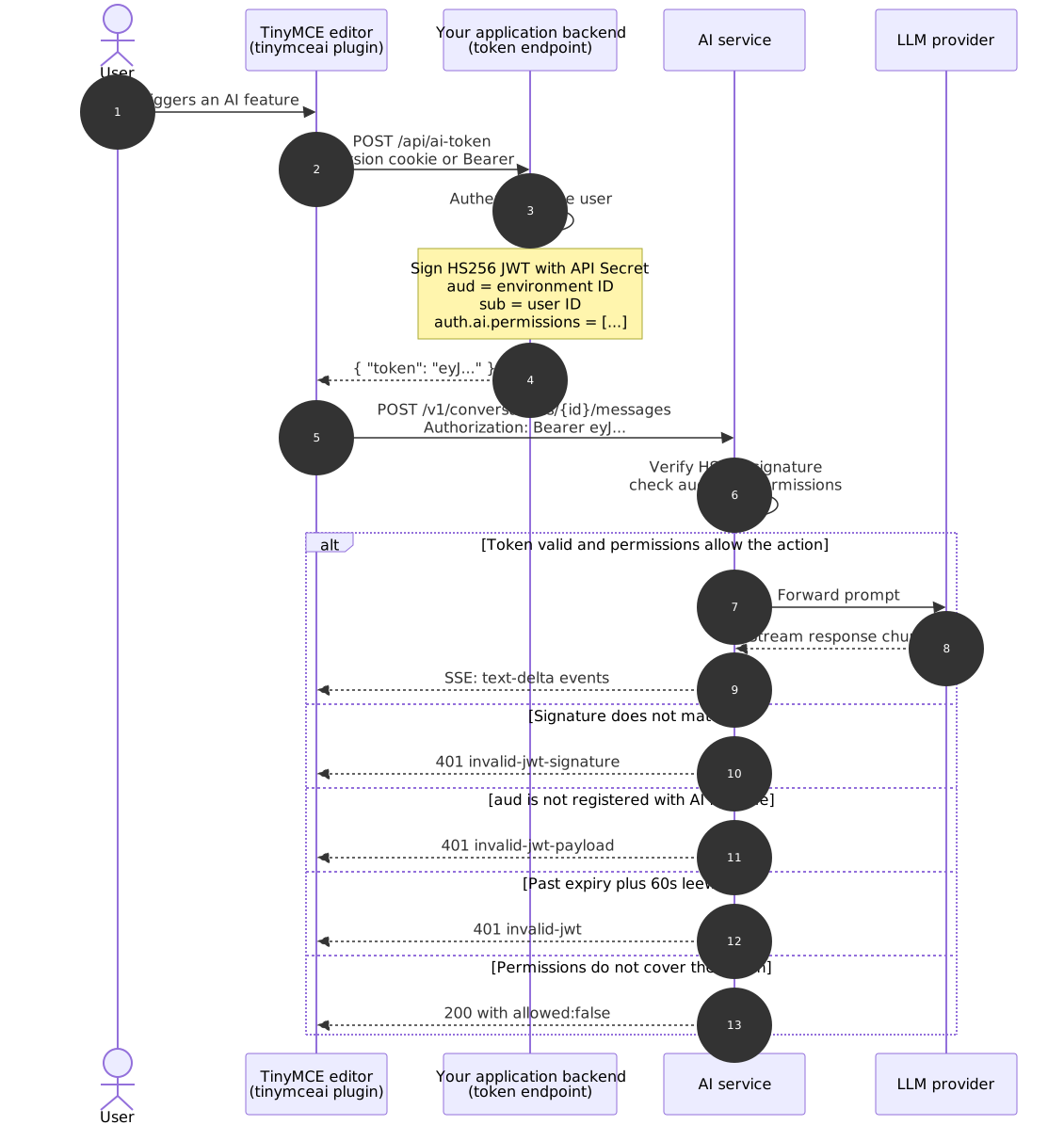
The shared secret (API Secret) never leaves the application back end. The editor only ever sees signed tokens, and the AI service only ever sees signed tokens; neither has direct access to the secret.
Signing model
| Property | Value |
|---|---|
Algorithm |
|
Key type |
Symmetric shared secret |
Key source |
API Secret generated for an access key inside an environment through the Management Panel |
Header format |
|
Pin implementations to HS256.
The API Secret
The API Secret is generated when creating an access key inside an environment, in the Management Panel under Environments → <env> → Access keys → New access key.
-
It is shown once on the creation screen. Copy it immediately into a secret manager such as Vault, AWS Secrets Manager, Doppler, or a local
.envfile. -
If the secret is lost, rotate: create a new access key, deploy the new secret, then revoke the old key.
-
This is not the
ENVIRONMENTS_MANAGEMENT_SECRET_KEYenvironment variable; that one is used for Management Panel logins, not user-facing AI tokens. Mixing them up producesinvalid-jwt-signature.
API Secret compared with ENVIRONMENTS_MANAGEMENT_SECRET_KEY
| Credential | Purpose | Used by |
|---|---|---|
API Secret |
Signs user-facing JWTs presented to the AI runtime endpoints. Created per access key inside an environment. |
The application token endpoint. Never appears in any management call. |
|
Signs Management Panel logins. Set as an environment variable on the AI service container. |
The Management Panel UI. |
These two credentials are unrelated. Using one in place of the other produces invalid-jwt-signature.
Required claims
Every token MUST contain the following claims.
| Claim | Type | Description |
|---|---|---|
|
string |
The Environment ID, copied from the Management Panel. UUID-shaped. Type must be string, not array; the verifier rejects array-shaped |
|
number |
Issued-at, seconds since epoch (UTC). |
|
number |
Expiry, seconds since epoch (UTC). Recommend |
|
string |
Unique, stable user identifier. Conversation history is isolated per- |
|
|
Array of feature permission strings. See the permissions reference below. Wildcards ( |
Optional claims
| Claim | Type | Description |
|---|---|---|
|
string |
Display name shown in the conversation history UI. |
|
string |
Email shown in the conversation history UI. Not used for authentication. |
The verifier ignores additional unknown claims. Standard JWT claims (iss, nbf, jti) cause no harm when included; the verifier does not validate them, but they pass through.
Permissions reference
This is the canonical permission list for the AI service.
Conversation and global features
| Permission | Grants |
|---|---|
|
All conversation operations: create, list, send message, delete |
|
Create new conversations |
|
List and read existing conversations |
|
Delete conversations |
|
Access the built-in agent model (model ID |
|
Access a specific custom model configured through the |
|
All built-in quick actions (rewrite, summarize, expand, translate, change tone, and related operations) |
|
All built-in review features (correctness, clarity, readability, tone, and related checks) |
Model permission syntax
ai:models:<provider>:<model-id> selects a specific custom model. The parser is not a greedy colon-split; it understands that <model-id> may itself contain colons and dots.
Examples:
ai:models:openai:gpt-5-mini
ai:models:openai:gpt-4o
ai:models:anthropic:claude-sonnet-4-5
ai:models:bedrock:us.anthropic.claude-sonnet-4-20250514-v1:0
ai:models:vertex:gemini-2.5-pro
ai:models:azure:my-gpt5-deployment
For Azure, <model-id> is the deployment name configured in the Azure portal, not the underlying OpenAI model name.
For Bedrock models with an inference profile prefix (us., eu., apac.) and embedded version colons (v1:0), include them verbatim; the parser handles them.
What not to put in auth.ai.permissions
| Do not use | Reason |
|---|---|
|
Appears in the cloud JWT doc. The on-premises service rejects this with |
|
Rejected. The verifier requires structured permission strings. |
|
The on-premises service requires the explicit |
A single string instead of an array |
Rejected. |
Full-access set
For demos and admin-tier users, this is the standard grant:
[
  "ai:conversations:*",
  "ai:models:agent",
  "ai:actions:system:*",
  "ai:reviews:system:*"
]
When adding custom models through the MODELS environment variable, append one ai:models:<provider>:<model-id> entry for each custom model to expose in the selector.
Example payload
A complete, decoded payload for a logged-in user with full access to a single OpenAI model:
{
  "aud": "5f1a2b3c-1234-5678-9abc-def012345678",
  "iat": 1746950400,
  "exp": 1746954000,
  "sub": "user_8f3c9a12",
  "user": {
    "name": "Priya Patel",
    "email": "priya.patel@example.com"
  },
  "auth": {
    "ai": {
      "permissions": [
        "ai:conversations:*",
        "ai:models:agent",
        "ai:models:openai:gpt-5-mini",
        "ai:actions:system:*",
        "ai:reviews:system:*"
      ]
    }
  }
}
Signed with HS256 using the API Secret, then sent as:
Authorization: Bearer eyJhbGciOiJIUzI1NiIs...
Production token endpoint examples
Each example reads AI_ENV_ID and AI_API_SECRET from environment variables, authenticates the user through the framework’s session/auth layer, signs an HS256 token, and returns {"token": "…"} as JSON. The endpoint runs in the application back end; the AI service never sees the API Secret directly.
| Language | Framework / Library |
|---|---|
Node.js |
Express + |
Python |
Django + |
PHP |
Laravel + |
Ruby |
Rails + |
C# |
.NET + |
Go |
|
Java |
Spring Boot + |
Node.js (Express + jsonwebtoken)
npm install express jsonwebtokenconst express = require('express');
const jwt = require('jsonwebtoken');
const app = express();
const ENV_ID = process.env.AI_ENV_ID;
const API_SECRET = process.env.AI_API_SECRET;
app.post('/api/ai-token', requireLogin, (req, res) => {
const user = req.user;
const now = Math.floor(Date.now() / 1000);
const payload = {
aud: ENV_ID,
iat: now,
exp: now + 3600,
sub: String(user.id),
user: {
name: user.displayName,
email: user.email,
},
auth: {
ai: {
permissions: [
'ai:conversations:*',
'ai:models:agent',
'ai:actions:system:*',
'ai:reviews:system:*',
],
},
},
};
const token = jwt.sign(payload, API_SECRET, { algorithm: 'HS256' });
res.json({ token });
});
function requireLogin(req, res, next) {
if (!req.user) return res.status(401).json({ error: 'unauthenticated' });
next();
}
app.listen(3000);Python (Django + PyJWT)
pip install PyJWTimport os
import time
import jwt
from django.http import JsonResponse
from django.views.decorators.http import require_POST
from django.contrib.auth.decorators import login_required
ENV_ID = os.environ["AI_ENV_ID"]
API_SECRET = os.environ["AI_API_SECRET"]
@require_POST
@login_required
def ai_token(request):
user = request.user
now = int(time.time())
payload = {
"aud": ENV_ID,
"iat": now,
"exp": now + 3600,
"sub": str(user.pk),
"user": {
"name": user.get_full_name() or user.username,
"email": user.email,
},
"auth": {
"ai": {
"permissions": [
"ai:conversations:*",
"ai:models:agent",
"ai:actions:system:*",
"ai:reviews:system:*",
],
},
},
}
token = jwt.encode(payload, API_SECRET, algorithm="HS256")
return JsonResponse({"token": token})Register the view in urls.py:
from django.urls import path
from . import views

urlpatterns = [
    path("api/ai-token", views.ai_token, name="ai-token"),
]
Python (Flask + PyJWT)
pip install Flask PyJWTimport os
import time
import jwt
from flask import Flask, jsonify, abort, session
app = Flask(__name__)
ENV_ID = os.environ["AI_ENV_ID"]
API_SECRET = os.environ["AI_API_SECRET"]
@app.post("/api/ai-token")
def ai_token():
user = session.get("user")
if not user:
abort(401)
now = int(time.time())
payload = {
"aud": ENV_ID,
"iat": now,
"exp": now + 3600,
"sub": str(user["id"]),
"user": {
"name": user["name"],
"email": user["email"],
},
"auth": {
"ai": {
"permissions": [
"ai:conversations:*",
"ai:models:agent",
"ai:actions:system:*",
"ai:reviews:system:*",
],
},
},
}
token = jwt.encode(payload, API_SECRET, algorithm="HS256")
return jsonify({"token": token})PHP (Laravel + firebase/php-jwt)
composer require firebase/php-jwt<?php
namespace App\Http\Controllers;
use Firebase\JWT\JWT;
use Illuminate\Http\JsonResponse;
use Illuminate\Support\Facades\Auth;
class AiTokenController extends Controller
{
public function issue(): JsonResponse
{
$user = Auth::user();
if (!$user) {
abort(401);
}
$envId = env('AI_ENV_ID');
$apiSecret = env('AI_API_SECRET');
$now = time();
$payload = [
'aud' => $envId,
'iat' => $now,
'exp' => $now + 3600,
'sub' => (string) $user->id,
'user' => [
'name' => $user->name,
'email' => $user->email,
],
'auth' => [
'ai' => [
'permissions' => [
'ai:conversations:*',
'ai:models:agent',
'ai:actions:system:*',
'ai:reviews:system:*',
],
],
],
];
$token = JWT::encode($payload, $apiSecret, 'HS256');
return response()->json(['token' => $token]);
}
}Route (routes/web.php or routes/api.php):
use App\Http\Controllers\AiTokenController;

Route::post('/api/ai-token', [AiTokenController::class, 'issue'])
    ->middleware('auth');
Ruby (Rails + jwt)
# Gemfile
gem 'jwt'
class AiTokensController < ApplicationController
before_action :authenticate_user!
def create
env_id = ENV.fetch('AI_ENV_ID')
api_secret = ENV.fetch('AI_API_SECRET')
now = Time.now.to_i
payload = {
aud: env_id,
iat: now,
exp: now + 3600,
sub: current_user.id.to_s,
user: {
name: current_user.name,
email: current_user.email
},
auth: {
ai: {
permissions: [
'ai:conversations:*',
'ai:models:agent',
'ai:actions:system:*',
'ai:reviews:system:*'
]
}
}
}
token = JWT.encode(payload, api_secret, 'HS256')
render json: { token: token }
end
endRoute (config/routes.rb):
post '/api/ai-token', to: 'ai_tokens#create'C# (.NET + System.IdentityModel.Tokens.Jwt)
dotnet add package System.IdentityModel.Tokens.Jwtusing System;
using System.IdentityModel.Tokens.Jwt;
using System.Security.Claims;
using System.Text;
using System.Text.Json;
using Microsoft.AspNetCore.Authorization;
using Microsoft.AspNetCore.Mvc;
using Microsoft.IdentityModel.Tokens;
[ApiController]
[Route("api/ai-token")]
[Authorize]
public class AiTokenController : ControllerBase
{
[HttpPost]
public IActionResult Issue()
{
var envId = Environment.GetEnvironmentVariable("AI_ENV_ID")!;
var apiSecret = Environment.GetEnvironmentVariable("AI_API_SECRET")!;
var userId = User.FindFirst(ClaimTypes.NameIdentifier)!.Value;
var userName = User.FindFirst(ClaimTypes.Name)?.Value ?? "";
var userEmail = User.FindFirst(ClaimTypes.Email)?.Value ?? "";
var now = DateTimeOffset.UtcNow.ToUnixTimeSeconds();
var payload = new JwtPayload
{
{ "aud", envId },
{ "iat", now },
{ "exp", now + 3600 },
{ "sub", userId },
{ "user", new { name = userName, email = userEmail } },
{ "auth", new {
ai = new {
permissions = new[] {
"ai:conversations:*",
"ai:models:agent",
"ai:actions:system:*",
"ai:reviews:system:*"
}
}
}}
};
var key = new SymmetricSecurityKey(Encoding.UTF8.GetBytes(apiSecret));
var creds = new SigningCredentials(key, SecurityAlgorithms.HmacSha256);
var header = new JwtHeader(creds);
var jwt = new JwtSecurityToken(header, payload);
var token = new JwtSecurityTokenHandler().WriteToken(jwt);
return Ok(new { token });
}
}Go (golang-jwt/jwt/v5)
go get github.com/golang-jwt/jwt/v5package main
import (
"encoding/json"
"net/http"
"os"
"time"
"github.com/golang-jwt/jwt/v5"
)
type tokenResponse struct {
Token string `json:"token"`
}
func aiTokenHandler(w http.ResponseWriter, r *http.Request) {
user, ok := userFromSession(r)
if !ok {
http.Error(w, "unauthenticated", http.StatusUnauthorized)
return
}
envID := os.Getenv("AI_ENV_ID")
apiSecret := os.Getenv("AI_API_SECRET")
now := time.Now().Unix()
claims := jwt.MapClaims{
"aud": envID,
"iat": now,
"exp": now + 3600,
"sub": user.ID,
"user": map[string]string{
"name": user.Name,
"email": user.Email,
},
"auth": map[string]any{
"ai": map[string]any{
"permissions": []string{
"ai:conversations:*",
"ai:models:agent",
"ai:actions:system:*",
"ai:reviews:system:*",
},
},
},
}
token := jwt.NewWithClaims(jwt.SigningMethodHS256, claims)
signed, err := token.SignedString([]byte(apiSecret))
if err != nil {
http.Error(w, "sign failed", http.StatusInternalServerError)
return
}
w.Header().Set("Content-Type", "application/json")
json.NewEncoder(w).Encode(tokenResponse{Token: signed})
}
func main() {
http.HandleFunc("/api/ai-token", aiTokenHandler)
http.ListenAndServe(":3000", nil)
}Java (Spring Boot + jjwt)
<!-- pom.xml -->
<dependency>
  <groupId>io.jsonwebtoken</groupId>
  <artifactId>jjwt-api</artifactId>
  <version>0.12.6</version>
</dependency>
<dependency>
  <groupId>io.jsonwebtoken</groupId>
  <artifactId>jjwt-impl</artifactId>
  <version>0.12.6</version>
  <scope>runtime</scope>
</dependency>
<dependency>
  <groupId>io.jsonwebtoken</groupId>
  <artifactId>jjwt-jackson</artifactId>
  <version>0.12.6</version>
  <scope>runtime</scope>
</dependency>
package com.example.ai;
import io.jsonwebtoken.Jwts;
import io.jsonwebtoken.security.Keys;
import org.springframework.security.core.annotation.AuthenticationPrincipal;
import org.springframework.security.core.userdetails.UserDetails;
import org.springframework.web.bind.annotation.*;
import javax.crypto.SecretKey;
import java.nio.charset.StandardCharsets;
import java.time.Instant;
import java.util.List;
import java.util.Map;
@RestController
@RequestMapping("/api/ai-token")
public class AiTokenController {
private final String envId = System.getenv("AI_ENV_ID");
private final String apiSecret = System.getenv("AI_API_SECRET");
@PostMapping
public Map<String, String> issue(@AuthenticationPrincipal UserDetails user) {
SecretKey key = Keys.hmacShaKeyFor(apiSecret.getBytes(StandardCharsets.UTF_8));
Instant now = Instant.now();
String token = Jwts.builder()
.audience().add(envId).and()
.issuedAt(java.util.Date.from(now))
.expiration(java.util.Date.from(now.plusSeconds(3600)))
.subject(user.getUsername())
.claim("user", Map.of(
"name", user.getUsername(),
"email", ""
))
.claim("auth", Map.of(
"ai", Map.of(
"permissions", List.of(
"ai:conversations:*",
"ai:models:agent",
"ai:actions:system:*",
"ai:reviews:system:*"
)
)
))
.signWith(key, Jwts.SIG.HS256)
.compact();
return Map.of("token", token);
}
}Editor-side token provider
Configure the TinyMCE editor to fetch a token from the application endpoint. The plugin calls the provider on demand and re-fetches when the token nears expiry.
tinymce.init({
  selector: 'textarea',
  plugins: 'tinymceai',
  toolbar: 'undo redo | bold italic | tinymceai-chat tinymceai-review tinymceai-quickactions',

  tinymceai_service_url: 'https://ai.example.com',

  tinymceai_token_provider: () =>
    fetch('/api/ai-token', { method: 'POST', credentials: 'include' })
      .then(r => r.json())
      .then(d => ({ token: d.token })),
});| Do not cache the JWT in application code. The plugin calls the provider on initialization and again as the token nears expiry; it manages refresh internally. |
The provider must return a Promise that resolves to { token: '<jwt>' }. Returning the raw string fails silently. If the provider rejects or returns a non-OK response, the plugin surfaces an error in the editor UI.
Set credentials: 'include' on the fetch when the token endpoint relies on session cookies. Without it, the browser does not send cookies on cross-origin requests. When the token endpoint is on the same origin as the editor, credentials: 'include' is harmless but unnecessary.
|
For cross-origin setups, configure the back end server to respond with Access-Control-Allow-Origin: <editor-origin> (not *) and Access-Control-Allow-Credentials: true. Set the session cookie with SameSite=None; Secure.
For framework-specific (React, Vue, Angular) integration, see Framework integration.
Permission gating patterns
A common deployment shape: one AI service serving multiple subscription tiers. The token endpoint derives the permission set from role, plan, or tenant.
Tiered permissions (basic / pro / enterprise)
function permissionsFor(user) {
  const base = [
    'ai:conversations:*',
    'ai:actions:system:*',
  ];

  switch (user.plan) {
    case 'basic':
      return [
        ...base,
        'ai:models:openai:gpt-5-mini',
      ];

    case 'pro':
      return [
        ...base,
        'ai:reviews:system:*',
        'ai:models:agent',
        'ai:models:openai:gpt-5-mini',
        'ai:models:openai:gpt-4o',
      ];

    case 'enterprise':
      return [
        ...base,
        'ai:reviews:system:*',
        'ai:models:agent',
        'ai:models:openai:gpt-5-mini',
        'ai:models:openai:gpt-4o',
        'ai:models:anthropic:claude-sonnet-4-5',
        'ai:models:bedrock:us.anthropic.claude-sonnet-4-20250514-v1:0',
      ];

    default:
      return base;
  }
}
Read-only viewers
For deployments that should expose history without allowing new conversations:
[
  'ai:conversations:read',
]
Multi-tenant: separate environments
If tenants must be fully isolated (separate conversation history, separate access keys, separate audit logs), give each tenant its own Environment in the Management Panel, mint tokens with the tenant-specific aud and AI_API_SECRET, and route in the token endpoint:
function envFor(tenantId) {
  return {
    envId:     process.env[`AI_ENV_ID_${tenantId}`],
    apiSecret: process.env[`AI_API_SECRET_${tenantId}`],
  };
}
Verification and troubleshooting
Decode a token without verifying
jwt.io accepts pasted tokens and shows the header and payload. Alternatively:
python3 -c "import jwt; print(jwt.decode('<token>', options={'verify_signature': False}))"node -e "console.log(JSON.parse(Buffer.from(process.argv[1].split('.')[1],'base64url')))" '<token>'When debugging, start here. Most "auth failures" reflect wrong claim values rather than signing problems.
Common failure modes
| Symptom | Cause | Fix |
|---|---|---|
|
API Secret mismatch |
Verify |
|
Token signed with RS256 |
Switch to HS256 with the API Secret. See top-of-page warning. |
|
|
Confirm the Environment ID from the Management Panel matches |
|
Environment created through raw management API rather than the Management Panel UI |
Recreate through the panel. See the Environment creation section below. |
|
Token is past |
Request a new token. The server allows 60-second clock-skew leeway; anything beyond is rejected with |
|
Environment is in |
Recreate through Management Panel UI. |
|
Wrong shape for |
Must be |
|
Missing the specific permission |
Decode token, check the |
Token silently rejected, no decoded error |
RS256 signature |
Re-sign with HS256. |
|
|
Some JWT libraries default to array |
Editor shows "Failed to authenticate" |
Token endpoint returned non-JSON, returned |
Open browser devtools → Network → inspect the response from |
Sanity-check a token manually
TOKEN=$(curl -s -X POST http://localhost:3001/api/ai-token | jq -r .token)

curl -i https://ai.example.com/v1/conversations \
  -H "Authorization: Bearer $TOKEN" \
  -H "Content-Type: application/json" \
  -d '{}'
A 201 Created confirms the full chain works: secret, claims, permissions, environment registration.
Token lifetime guidance
| Scenario | Recommended exp - iat |
|---|---|
Local development |
1 hour ( |
Demos |
1 hour |
Production |
5–15 minutes ( |
High-security / regulated |
5 minutes, plus short-lived sessions on the auth layer |
Short-lived tokens limit exposure if a token leaks through a browser extension, log capture, or error report. The editor re-requests a token as needed through tinymceai_token_provider, so long-lived tokens provide no practical benefit.
See also
-
Getting started — end-to-end deployment, including a demo token server
-
large language model (LLM) providers — configuring custom models through
MODELSand theai:models:<provider>:<model-id>permission syntax -
Troubleshooting — full troubleshooting catalog beyond JWT
-
Framework integration — editor-side integration patterns for React, Vue, and Angular, including
tinymceai_token_providerwrappers